Why is a pinhole camera image upside down?
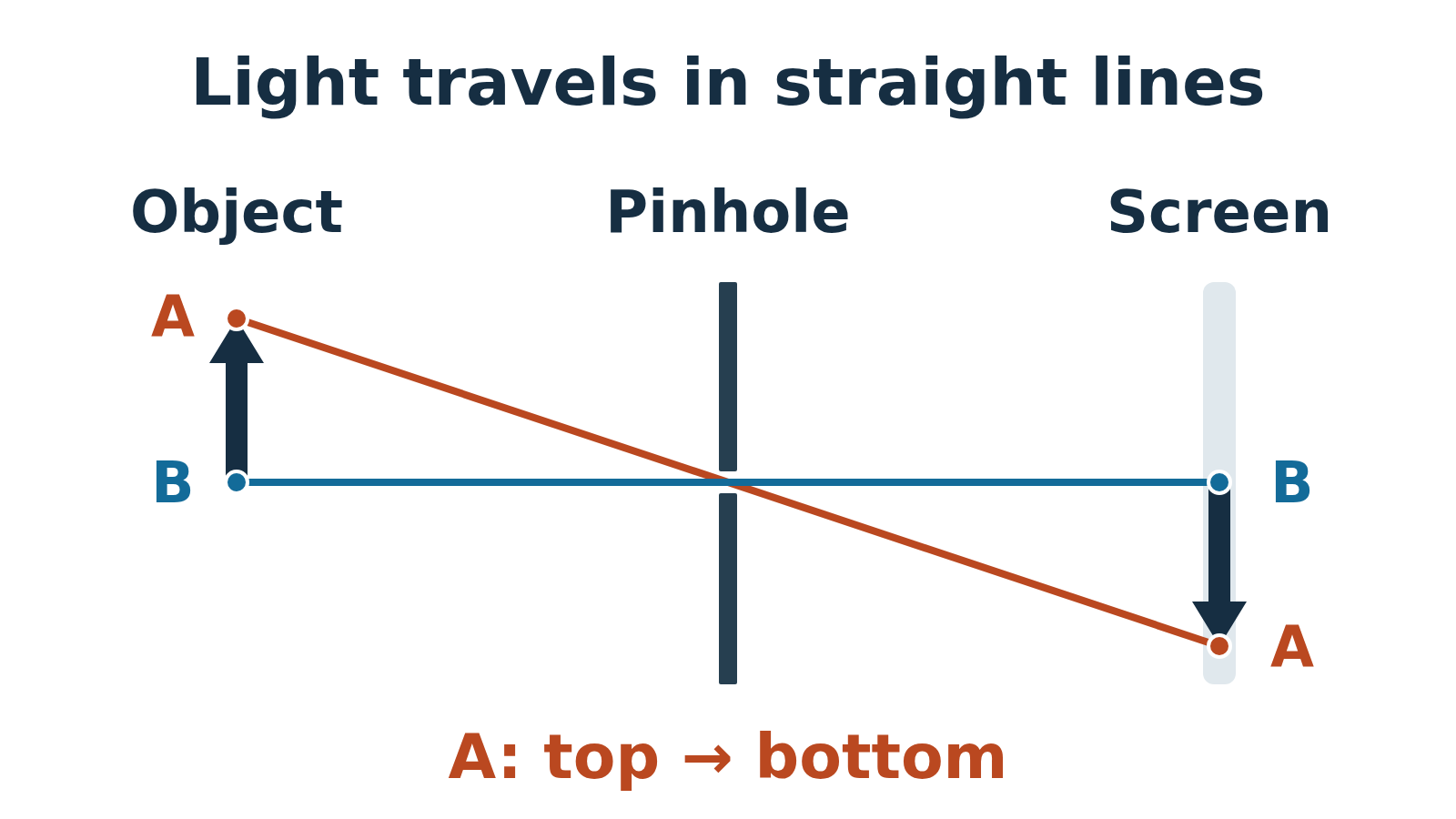
The rays keep going straight after they cross at the hole. Light from the top of the object reaches the bottom of the screen, so the image is upside down.
Follow one point of the object
A pinhole camera is a dark box with a small hole on one side and a screen on the other. It needs no lens or mirror. A bright object emits light, or reflects light from a lamp or the sky, in many directions. Only a narrow bundle from each point can pass through the hole.
In the simple ray model, light travels straight through the air. A ray from the top of the object passes through the hole and continues toward the bottom of the screen. Light from a lower point lands higher. The hole does not bend or flip the rays: their paths cross there. The screen catches an inverted image.
Make a viewer for a bright window scene
Use an opaque cardboard box, aluminium foil, tape and a piece of translucent tracing paper. Thin translucent baking parchment can also work; opaque paper blocks the view and clear plastic does not make a useful diffusing screen. An adult should do the cutting and make the pinhole.
Choose a bright building or tree outside a window, with the Sun well outside the direction you aim. Do not aim this viewer at the Sun or look at the Sun through a hole. You will look at the paper screen, not through the pinhole.
- 1. Cut a small window in one end of the box. Cover it completely with foil, tape the edges and make one tiny hole with the tip of a pin. Do not push the whole pin through at first.
- 2. Cut a larger viewing window in the opposite end. Tape tracing paper flat across it; this is the screen. Close the box and tape gaps that would let other light in.
- 3. Point the foil end at the chosen scene. Look at the outside of the paper screen on the opposite end. Shade the screen and your view of it with a dark cloth, or use a darkened room. Keep the pinhole uncovered.
- 4. Give your eyes a little time to adjust. Look for a recognisable top and bottom: a roof above a window, for example. On the screen, the roof should appear below that window. Move the box gently until the scene lies on the screen.
Change one thing, then compare
Keep the object and its distance from the hole fixed when comparing screen positions. A longer box places the screen farther from the hole. Change only one feature at a time so you can explain the result.
- Screen farther from the hole: the image becomes larger and dimmer. More magnification alone does not mean more detail.
- Larger hole: more light enters, but geometric blur increases because each object point produces a larger patch instead of a tiny spot.
- Smaller hole: geometric blur decreases, but so does brightness. Shrinking the hole indefinitely does not give perfect sharpness; diffraction also blurs very small-aperture images.
Predict the image size before changing the box
For a flat object parallel to the screen, similar triangles give this ideal ray-model calculation. Measure both distances from the pinhole and use the same units:
Image height = object height × (hole-to-screen distance ÷ object-to-hole distance).
Suppose a 40 cm tall object is 200 cm from the hole. With the screen 10 cm behind the hole, its image is 40 × 10 ÷ 200 = 2 cm tall. Put the screen 20 cm behind the hole and the image is 4 cm tall, still upside down.
These are calculated examples, not measurements from a built camera. A real hole has finite width; a rough hole, a wrinkled screen and stray light can make the outline harder to measure.
If you cannot see a picture
- Only a pale glow: first shade the screen and seal light leaks. Check that you are looking at translucent paper with the hole on the opposite side.
- Too dark: choose a brighter, high-contrast scene and shade the screen more thoroughly. If necessary, try a slightly larger hole in a fresh piece of foil, then compare the sharpness.
- Bright but indistinct: replace a large or ragged hole with a smaller, cleaner one. Check that the paper is flat and only one hole admits light.
- Nothing identifiable: aim at a simple roofline or window frame. A tiny cup-sized image or a low-contrast indoor wall can be difficult to recognise.
A quick prediction
In the example above, what happens if the screen stays 10 cm behind the hole but the 40 cm object moves from 200 cm to 100 cm away?
Its image grows from 2 cm to 4 cm and remains inverted. The distance in the denominator halves. The geometry changes; the rays still travel straight.